
Fix For Generic Host Process for Win32 Services Error
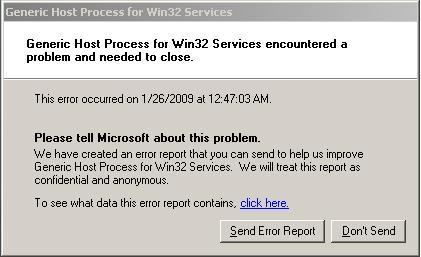
Generic Host Process for Win32 Services Error
The Generic Host Process for Win32 Services Error is a common error for Windows XP machines, but can also occur on other Windows systems as well. This error is caused by an acute problem inside the Windows XP system files, which make your computer unable to operate a certain number of services which it needs to run. This tutorial will show you how to fix this error for good.
Symptoms Of The Generic Host Process for Win32 Services Error
The Generic Host Process for Win32 Services Error is normally shown when you either boot or shut down your PC. However, it can appear at other times as well. The error is characterized with a message that says:
Generic Host Process for Win32 Services has encountered a problem and needs to close
This error is extremely annoying and it’s also the cause of some more errors which form when you try and update Windows. For example, when attempting to download Windows Update on your PC, the following error message may appear:
Svchost.exe application error. The instruction at “Ox745f2780″ referenced memory at 0x00000000000000. The memory could not be read.
To fix this error, you need to be able to use this simple process:
How To Fix The Generic Host Process for Win32 Services Error
- Click “Start”, Click “Run” and type this command: “net stop wuauserv”
- Open “My Computer” and then delete the following folders:
C/Wu Temp &
C:/Windows/System32/Catroot2
- Open the C:/Windows folder
- Rename the folder “SoftwareDistribution” to “SoftwareDistribution2”
- Next, open the C:\Windows\system32 folder, and then rename the following files by changing their extensions from .dll to .other:
- Wuweb.dll
- Wuapi.dll
- Wuauclt.exe
- Wuaucpl.cpl
- Wuaueng1.dll
- Wuaueng.dll
- Wuauserv.dll
- Wucltui.dll
- Wups2.dll
- Wups.dll
(Please Note that ‘C:/’ Represents the drive where you have your operating system installed)
- Restart Your PC
This should cure the error but in order to make sure that the Generic Host Process for Win32 Services Error stays off your computer for good, it is advised that you use a ‘registry cleaner’ to fix any more problems that might cause similar error messages. You can download this registry cleaner to clean away any potential damaged settings that are on your PC.

 Is your computer running out of disk space? Scan it for duplicate files right now and free up gigabytes in three simple clicks.