
How To Remove The Google Redirect Virus
The Google Redirect Virus is one of the most annoying types of malware that you can have. The “Google redirect virus” is where every search engine you go on has random redirects to price comparison websites or some other make-money scheme. The virus will be making your computer run very slow as well as redirecting all the search results that you go on. You will eventually reach the site you want, but only after clicking on the links 2 or 3 times.
The Google redirect virus is a big problem for many people and it can appear overnight. Fortunately, there’s an easy way to remove the virus for good:
Top Recommended Google Redirect Virus Removal

FixRedirectVirus.org is a newly created online Google redirect virus removal website. Created by a good friend of ours, the FixRedirectVirus.org website will provide all the information you need to quickly get rid of the Google Redirect Virus from your PC. We highly recommend this program – it has a lot of features inside which will get rid of all cases of the Google Redirect Virus from your PC.
CLICK HERE TO GET RID Of THE GOOGLE REDIRECT VIRUS FOR GOOD
How To Remove The Google Redirect Virus With ComboFix
Step 1: Download the ComboFix utility to your desktop. You can get it from here.
You will just need to click on one of those links, and then click on “Save”:
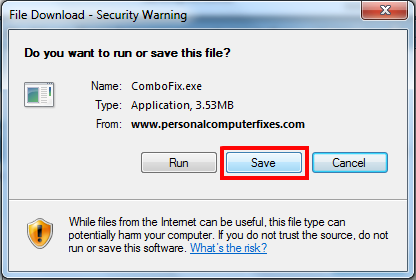
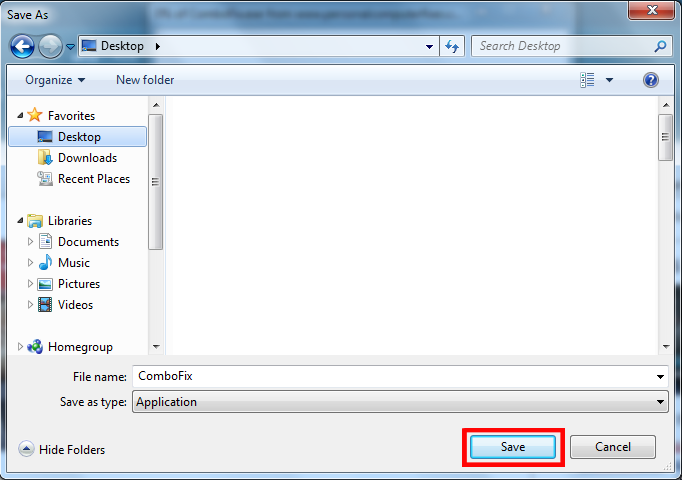
You should select a place to save the Combofix program and then choose that place to save it like on the image above.
Step 2: Close any web browsers and other programs that might conflict with ComboFix. This is essential, because it could ruin any of your open programs.
Step 3: Load up Notepad and then paste the following text into it (or you could just download the text file from here):
File::
c:\windows\system32\winupdate.exe
c:\windows\system32\winhelper.dll
c:\windows\system32\AVR09.exe
c:\Program Files\AdvancedVirusRemover\PAVRM.exe
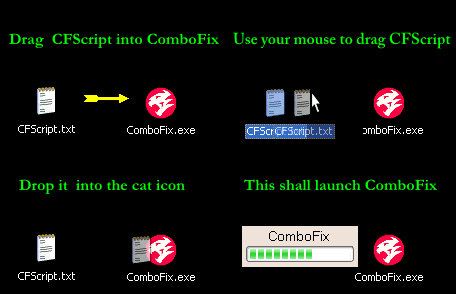
Step 4: Put the cfscript.txt file into the same directory as ComboFix and then drag it onto the application like in the image below:
Step 5: download this registry cleaner to clean up all the remaining settings & virus files that are left. This will remove all the last traces of the problem and will make your computer run faster as well.
That’s how to remove the Google redirect virus. After you’ve done all of the above, restart your PC and see if the same thing happens again. Please comment on whether it works or doesn’t!
 Is your computer running out of disk space? Scan it for duplicate files right now and free up gigabytes in three simple clicks.